July 15, 2026 · 6:00 PM
Public House Bangkok
90 min
25 seats only
Windows · 16GB RAM · No GPU needed
The Sovereign
Workspace
Uploading confidential documents to cloud AI means trading absolute privacy for quick convenience. Tonight, you build a powerful AI that runs 100% offline on your laptop — zero leaks, total control.
Zero Leaks · Total Control
The question you'll be able to answer by the end of the night: "What decided what the model read, and can I change it?"
Board 1 The Privacy Problem
Every time you upload a document to ChatGPT, Copilot, or Claude, it leaves your machine. It may be stored. It may be used to train the next model. Nobody can promise you it stays confidential.
In April 2023, Samsung engineers pasted proprietary source code into ChatGPT three times in twenty days. Samsung banned every generative AI tool company-wide within a month.
Tonight you build the alternative. Nothing leaves this room.
Forget generic prompt engineering. This is a 90-minute, hands-on workshop built around a simple 3-act story:
Act One
It Works.
Your local AI reads a 3-page confidential document in seconds. We'll switch off the venue Wi-Fi mid-session to prove nothing ever left your laptop.
Act Two
It Breaks.
A 29-page document breaks it. You learn that private is not the same as correct, and what decides what the model actually reads.
Act Three
The Fix.
We change 3 settings that control what gets read. Same document, same question. Now it works, and you know why.
Hands-On Finale: You apply this to your own confidential business documents and leave with a working, private AI on your laptop.
One more thing — right before Act Two
Private is not the same as correct.
Getting your data under your own roof is only step one. A model that never touches the internet can still hand you a confident, wrong answer, once a document gets big. Step two is understanding what decides which part of a large document the model actually reads, and knowing you can change it.
Two installs. That's all. Both need internet to download. Do this at home on a fast connection, not at the venue — we cannot spend the evening fighting the venue Wi-Fi to download gigabytes of files.
1
Install Ollama
The engine that runs the AI quietly in the background. You won't even open it directly.
ollama pull phi4-mini
Downloads ~2.5GB
Download Ollama →
2
Install Msty
The interface you actually use. Attach documents, chat, and later build private search over larger ones. No terminal needed.
Settings → Local AI → Switch On
Download Msty →
Why these two? Once installed, both run 100% offline. Your documents stay on your laptop. Zero leaks. You own the model the way you own a file.
Bring your confidential documents
3–5 business documents in English or Thai. PDF or Word. Internal policies, strategy briefs, contracts. Put them in one folder you can find quickly. We process them on your laptop, offline. Thai documents work best on the Qwen2.5 backup model — flag it when you arrive and we'll switch you over.
Test before you come: Open Msty, select phi4-mini, type Say "ready" if you are working. If you get a response in 15–20 seconds, you're ready.
Set your expectations on speed: a real answer on your own document takes 20–30 seconds, not the 3–5 seconds you're used to from cloud tools. That's not a broken install — that's your laptop doing the work instead of someone else's server farm. You're trading a few seconds for zero data leaving the room. Decide tonight which one matters more, for which document.
Three real documents, mapped to the mechanism by actual size.
CDT Directive
1,642 words · ~3 pages
Act One
Cyber Doctrine
~11,400 words · ~29 pages
Act Two & Three
COPD
~145,000 words · 500+ pages
Stretch Goal
Knowing which one you are using is a professional responsibility. Not all "local" apps are actually local.
Category A — Your data leaves
Hosted & "Fake Local"
- Your document leaves your machine
- Stored on servers you don't control
- May train their models on your prompts
- No guarantee of confidentiality
- Fast: 3–5 seconds per answer
Category B — Your data stays
Truly Self-hosted — what we build tonight
- Ollama + Msty (with real model files)
- Nothing leaves your machine, ever
- 100% offline, once installed
- You own the model like a file (check the GB size!)
- Slower: 20–30 seconds per answer, the price of privacy
THE "FAKE LOCAL" TRAP
Some models in Ollama end in :cloud and show a - for file size. They run inside your local app, but they are just proxies sending your confidential data to remote servers. Always check the size!
What about APIs and "Pro" Cloud Tiers?
Paying for an API key or a premium cloud subscription does not move you to Category B. You are still renting compute on someone else's server. You do not own the model weights, the infrastructure, or the data pipeline. If the document is confidential, it still leaves the building.
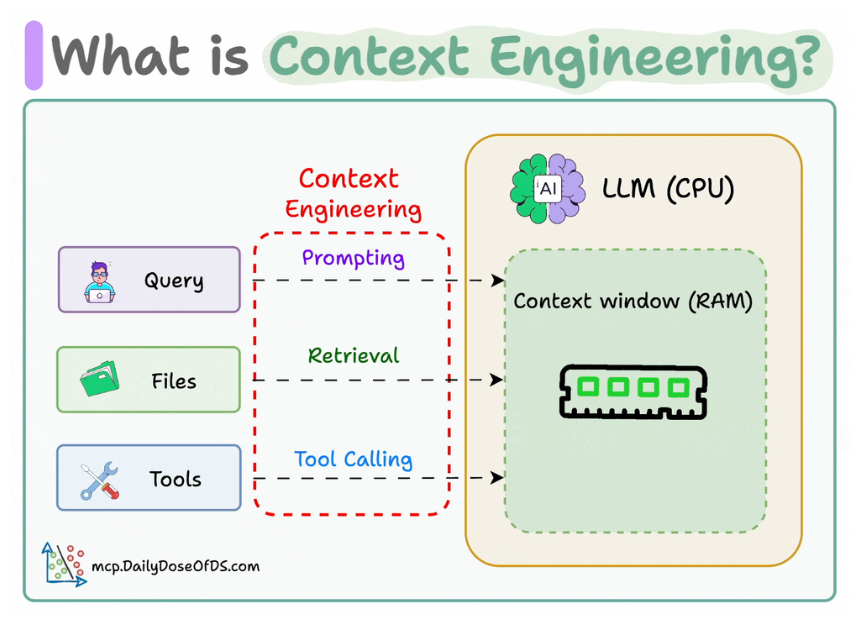
The assumption that trips people up: "When I attach a document, the model reads it." Past a certain size, it does not. It reads a slice, picked by a retrieval step, not the whole document.
Your document
29 pages · ~15,000 tokens (Cyber Doctrine)
retrieval step picks chunks — this is what Board 4 controls
Selection bottleneck
← most AI failures happen here
only what fits passes through
Context window
16,000–32,000 tokens · 8–16% of your document
only this reaches the model
Phi-4 Mini — in your RAM
no internet · runs on your laptop
answer constrained by what was in the window
Answer
not by what was in the document
Under 20 pages, nothing decides for you, attach the whole thing. Over 20 pages, three settings decide, and you can change every one of them. This works on every AI system you will ever use. It does not expire when the model changes.
1
Chunking method
How the document gets cut into pieces before anything is retrieved.
2
Chunk size
How big each piece is. Too small, and a piece carries half a thought.
3
Top-K
How many pieces get handed to the model per question.
The safety net, always
Ask the model to point to the exact paragraph number or heading. If it cannot point to a real location in the text, it invented it.
How to use these: open a new chat in Msty, click the paperclip icon and attach your document (PDF or Word) directly to the message. Then paste one of the prompts below and hit enter. This works for documents under 20 pages.
Prompt A
Summarize
Attach your document first · For documents under 20 pages
[System Context]
You are a precise analyst.
[Task]
Summarize this Directive in five bullet points.
[Constraints]
Use only the attached document.
If the document does not contain enough information to answer, say so and stop.
Maximum 25 words per bullet point.
[Output Format]
Five bullet points. No introduction. No conclusion.
Prompt B
Extract Obligations
Attach your document first · Best for contracts, policies, directives
[System Context]
You are a compliance analyst.
[Task]
Find every task, responsibility, and named role in this Directive,
including Annex A and B.
[Constraints]
Use only the attached document.
If the document does not contain enough information, say so and stop.
Provide a paraphrased supporting sentence for each item (max 30 words).
Do not attempt verbatim quotes.
[Output Format]
Numbered list. Each item:
— The task or obligation
— Who is responsible
— Deadline or timeframe if stated
— Paraphrased supporting sentence
Prompt C
Find The Gap
Attach your document first · The one that surprises people
[System Context]
You are a critical reviewer evaluating an institutional policy directive.
[Task]
What is the single biggest gap or unresolved question
this document fails to address?
[Constraints]
Rely strictly on the attached document.
If the document appears comprehensive and you cannot identify a clear gap
based strictly on the text, state that and stop.
[Output Format]
- **The Gap:** Provide a concise description (max 30 words).
- **Location:** Name the section or annex reference.
- **Impact:** Explain briefly why this matters (max 30 words).
Tonight
Phi-4 Mini + Msty
Private document chat, on your laptop, 100% offline once installed.
This week
Private search over larger documents
Same machine, same app. You control the three settings from Board 4.
Next year
A private agent on your documents
Connect it to your email, calendar, and files. Zero leaks, nothing leaves your machine.
2027
You can tune what others can't explain
Your competitors' agents break silently. You know which setting to check. That skill started tonight.
Private — your data stays on your machine
Hosted — fast and free, your data leaves
Private = your data stays. Hosted = convenient but your data leaves. Choose based on what the document contains.
Required before July 15
Once your two installs are done and tested, reply with:
READY — [your name] — [RAM] — [processor]
Example: READY — Marc Dubois — 16GB — i7-1355U
No reply the day before the session means your seat goes to the waitlist. No exceptions — seats are capped at 25 so everyone gets hands-on time.